Navigator Atlas

Know the impact before you make the change.

Change Nonstop Code with Confidence

In a legacy Nonstop environment, every change carries hidden risk. A modified program can break callers you didn't know existed. A changed file layout can silently corrupt programs across the system. A renamed field can ripple through copybooks, paragraphs, and data flows in ways no one has documented in years.

Navigator Atlas answers the questions you need answered before you touch anything. It performs deterministic static analysis of your COBOL, TAL, and SCOBOL source - mapping every call path, every file access, every field reference — and gives you a complete impact picture in seconds.

Impact Analysis

Four questions. Answered instantly. Scan your source folder once. Select any program, file, or field. Get the full picture.

1. Program Change Impact

If I change a program, what other programs could be affected? Atlas traces direct callers (programs that CALL or PERFORM this one), transitive callers (everything upstream in the call chain), and programs sharing files with it giving you the full blast radius before you write a single line.

Impact Tab - Program impact analysis

2. Dependencies

What libraries, files, and copybooks does this program touch? The Copybooks, Files, and Tables axes of the Impact view show every dependency this program has — and flip the question: select a copybook to see every program that includes it. 53 copybooks, 27 programs - mapped in one screen.

Copybook Impact - Dependency analysis

3. File Layout Changes

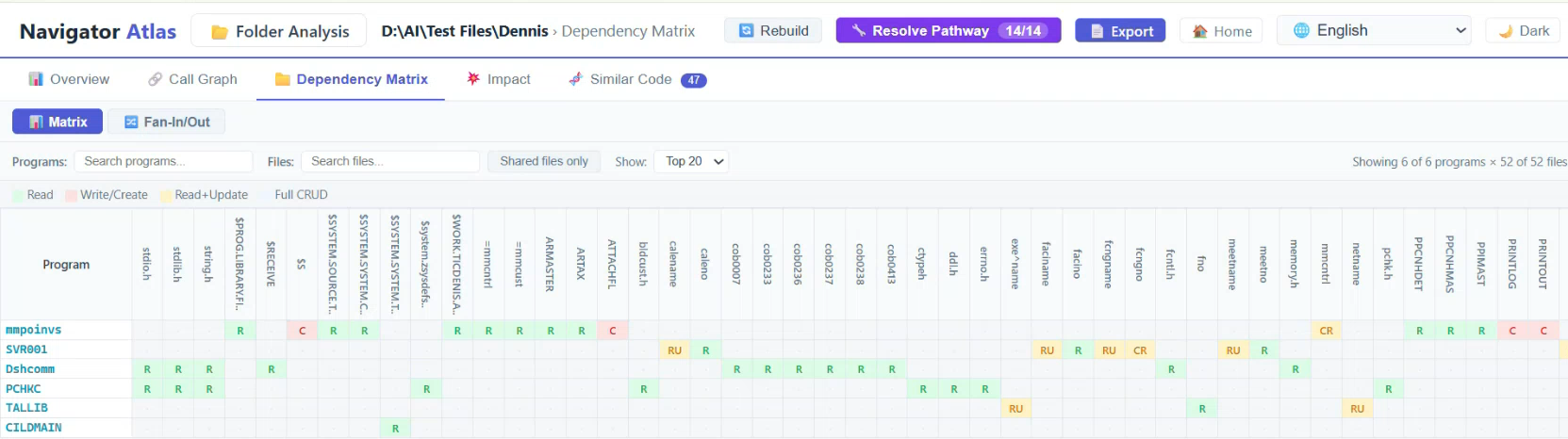
If I change a file layout, what programs will be affected? The Dependency Matrix → File→Programs view lists every file in the system and, for each file, every program that reads or writes it—with the exact CRUD operations (Create, Read, Update, Delete) each paragraph performs. No guessing. No grepping. Atlas already knows.

Dependency Matrix - File to program relationships

4. Field Ripple Effects

If I change a field in a file, what are the ripple effects? The Field XRef traces every variable defined in a file's record layout and shows exactly which paragraphs reference it — with line numbers, type, and usage count. Click a field to see the paragraph details: what it calls, what decisions it makes, what it reads and writes.

Field XRef - Field reference tracking
✓ No setup, no configuration required. Drop your source files into Atlas, click Analyze Folder, and the full impact map is ready. Analysis is deterministic— the same source always produces the same result, every time.

More Than Impact

Full program understanding and analysis capabilities built in.

Program Structure

Cyclomatic complexity per paragraph, nesting depth, dead code detection, and comprehensive line metrics.

Call Graph

Interactive force-directed graph of PERFORM, CALL, SEND, ENTER TAL, and GO TO edges. Zoom and filter by depth.

Step-Through Simulator

Walk code line by line, choose branches at IF/EVALUATE, and trace execution paths without compiling.

Screen Layout Preview

Renders SCOBOL SCREEN SECTION as a terminal preview. See the 6530 screen directly from source.

Quality Analysis

Flags complexity hotspots, uninitialized data, unused variables, and deep nesting. Risk-ranked folder dashboard.

HTML Export

Export self-contained HTML reports for any program or folder. Share with anyone — no Atlas install needed.

Supported Languages

Comprehensive language support with varying analysis depths.

Language Analysis Depth Impact Analysis Support
COBOL Full Program callers, file CRUD, field XRef, copybook dependencies
SCOBOL (Screen COBOL) Full + screens All COBOL impact features plus screen field cross-reference
TAL Full PROC callers, Guardian file I/O, ?SOURCE include chain
TACL Structure Routine extraction and call structure

What Navigator Atlas Delivers

Capability What You Get
Change Impact Analysis Full blast radius — callers, files, fields, copybooks
Cross-program Call Graph Every CALL, PERFORM, SEND edge traced
Dependency Matrix Programs × files CRUD matrix across entire codebase
Field Cross-Reference Every field tracked from definition to every paragraph that uses it
Results Consistency Deterministic — identical results every run
Deployment Self-contained, runs on-premises, no external dependencies

Technical Specifications

Platform

Windows 10/11 (64-bit)

Runtime

Self-contained, no .NET install required

Interface

Browser-based (Chrome, Edge, Firefox)

Network

Offline, SFTP only for remote file browse

Analysis Engine

Deterministic—consistent results, no cloud dependency

Output

Interactive web UI + exportable HTML reports

Ready to Know the Impact?

See Navigator Atlas in action. Get a personalized demo tailored to your Nonstop environment.

Request a Demo
Enlarged image