TIC Navigator analyzes COBOL, SCOBOL, TAL, C/C++, and TACL to extract business rules and system behavior — in plain language and diagrams. The result is a searchable knowledge base that lets your team understand legacy code without rewriting it.
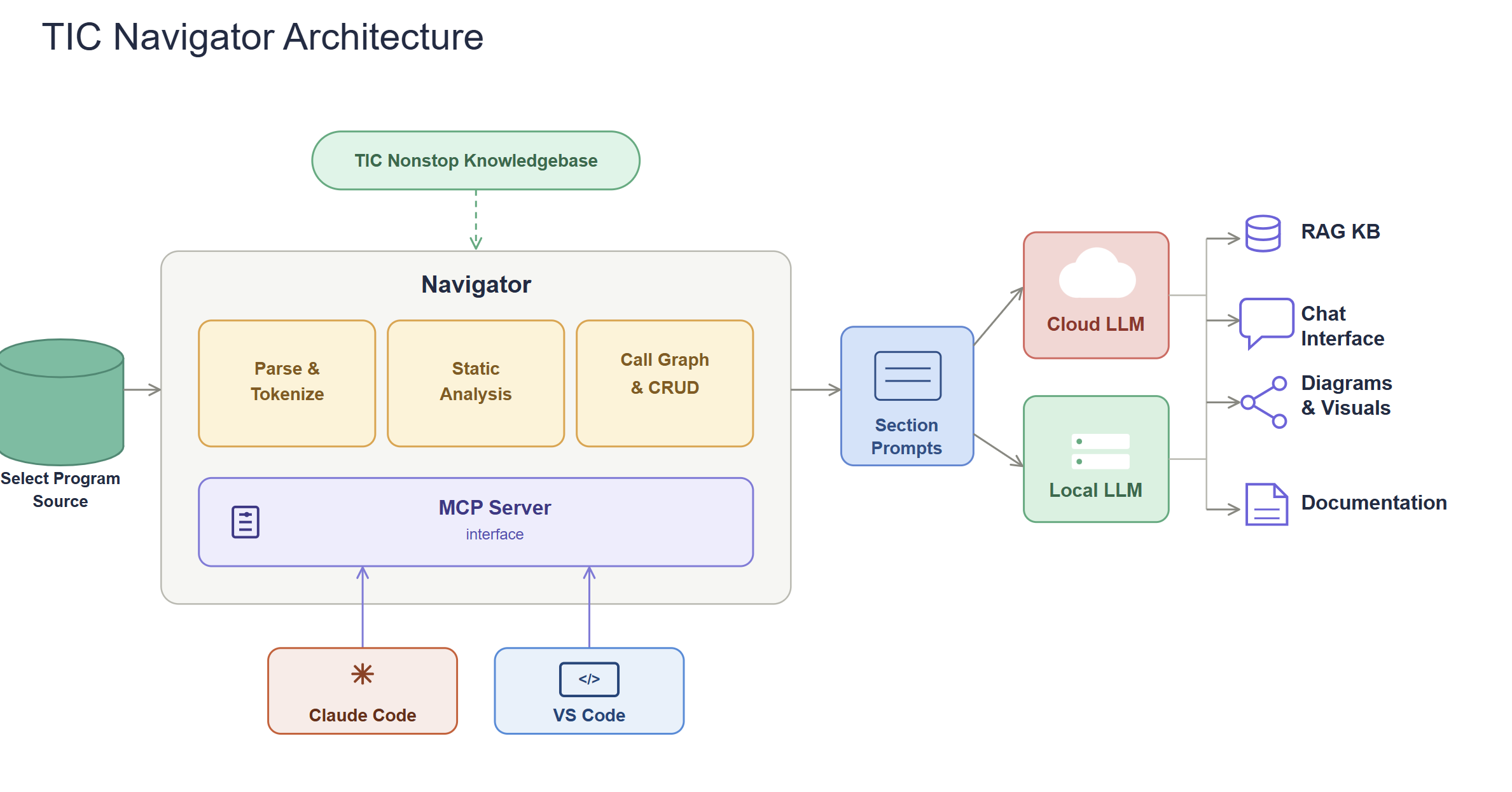
The diagram traces a single pass through Navigator, left to right: your source code goes in on one side, and documentation, diagrams, and answerable questions come out the other. The four steps beside it are the same journey, named — here is what each one is doing.
Scanning and analysis with metadata generation to understand your codebase structure
Navigator works from a read-only copy of your source — nothing is installed on the Nonstop system and nothing is written back. It parses and tokenizes each program, runs static analysis, and builds a call graph and CRUD map of which programs read and write which files. The result is a code property graph snapshot and a fact bundle: a structured, checkable description of your codebase, produced without any AI in the loop.
Nonstop-specific component interpretation using domain expertise
Those facts are combined with the TIC Nonstop Knowledgebase, which supplies the platform context a general-purpose model has never seen — how COBOL, SCOBOL, TAL, C/C++, and TACL are actually used on Nonstop. Together they build section prompts aimed at specific questions about specific components, rather than handing a model raw code and hoping.
Curated LLM combinations selected based on specific task requirements
Each prompt runs against the model best suited to it, drawn from a curated mix of cloud and local LLMs. The local path matters for more than speed: source that cannot leave your environment never has to.
Nonstop specialist output verification to ensure accuracy and reliability
Nonstop specialists review the output before it reaches you, and the results land in four places — a searchable RAG knowledge base, the chat interface, diagrams and visuals, and generated documentation. Because the facts were extracted deterministically in step 1, what you read is grounded in what your code does, not in what a model inferred it might do.
Auto-generate documentation directly from your source code
Capture business logic before retiring experts take it with them
Understand legacy systems faster to speed up migration

Ready to unlock your legacy system's potential?
Contact TIC Software today for a personalized demo and consultation.
Let us empower your Nonstop environment with the future of GenAI documentation.